Ribbon Menus
February 19, 2023
Last updated on September 29, 2026
Once installed, a OneMore tab is added to the ribbon, appearing after the View tab. You can customize its location; here it is shown after the Home tab - split into two images for readability.

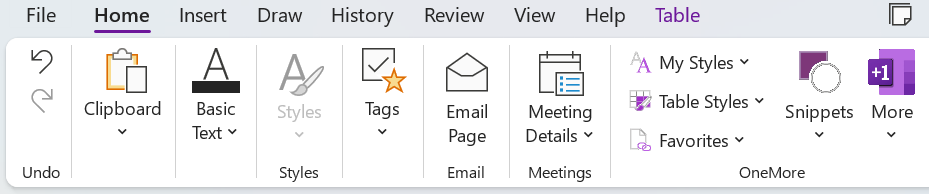
Alternatively, you can configure OneMore to occupy a new command group on the Home tab as shown here. This can be chosen from the OneMore Settings dialog.
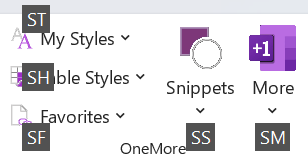
Quick Access to OneMore Features
In addition to the main menus, there are other ways of accessing OneMore features as explained here.
Extended Context Menus
OneNote presents different context menus when you right-click on different parts of its UI. OneMore extends some of these default context menus to add its own commands. You can customize the page body context menu that appears when you right-click text on a page.
Replay Your Last Command
Most OneMore commands can be replayed with a simple keyboard shortcut rather than through menus or even the Command Palette. The Replay Last Command feature is on the More menu
|
|
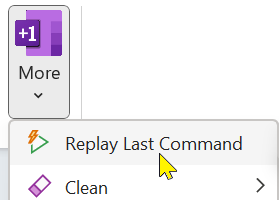
For example, if you run the To lowercase command from the menu, you can then rerun it from the Replay Last Command menu, or press the shortcut:
Alt + Shift + R
Key Shortcut Bindings
While all commands can be accessed from the OneMore ribbon group menus, some commands also have their own key bindings. These default bindings can be customized in the Settings dialog.
See the OneNote Keyboard Shortcuts page for a full list of default OneNote shortcut bindings.
OneNote Ribbon and Quick Access Toolbar
You can customize the OneNote ribbon, adding OneMore commands to a new ribbon group. However, this takes up more real estate and that group is often a click away if you've since moved to another ribbon tab. For a more consistent user experience, see the OneNote QAT article for an example showing how to customize the Quick Access Toolbar.
#omwiki #ombasics
© 2020 Steven M Cohn. All rights reserved.
Please consider a sponsorship or one-time donation to support ongoing development
Created with OneNote.